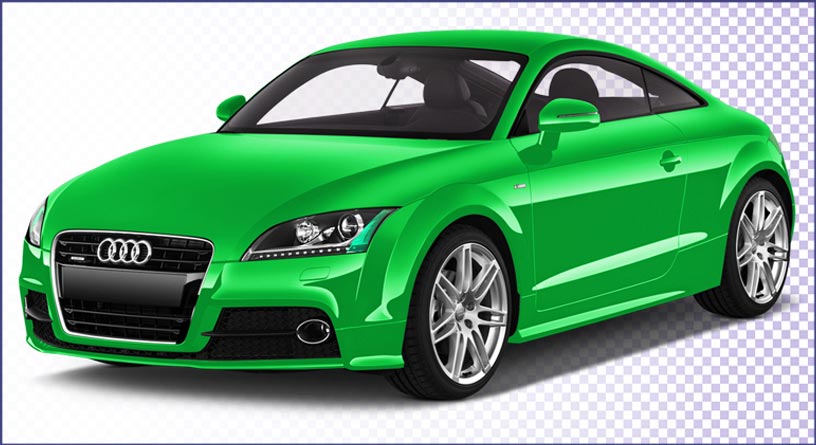

Shadow Creation & Drop Shadow: How Professional Shadows Improve Product Images
Learn how realistic drop shadows add depth, enhance product realism, and build consistent e-commerce catalogs.
A good product image is more than just removing the background. The right shadow can make a product look natural, realistic, and professional. This is why Shadow Creation and Drop Shadow are important parts of professional product image editing.
For e-commerce businesses, online stores, photographers, and brands, properly created shadows can make product images look more attractive while keeping them consistent across a website or online marketplace.
At WeClipImage, we provide professional Shadow Creation, Drop Shadow, and product image editing services to help businesses present their products in a clean and professional way.
What Is Shadow Creation?
Shadow Creation is the process of adding a realistic shadow to a product image after background removal or image editing.
When a product is photographed, it naturally creates a shadow because of the position and direction of the light source. However, after removing the original background, the natural shadow may also disappear.
A professional image editor can recreate the shadow digitally so the product still looks like it is standing naturally on a surface.
The shadow should match the product, light direction, angle, size, and overall image style. A poorly created shadow can make a product look unrealistic, while a well-made shadow can make it look natural and professional.
What Is a Drop Shadow?
A Drop Shadow is a digital shadow placed behind or underneath an object to create depth and separation from the background.
Drop shadows are commonly used in:A drop shadow can be soft, hard, long, short, dark, or subtle depending on the product and the required style.
Why Is Shadow Important for Product Images?
When a product is placed on a plain white or transparent background, it can sometimes appear as if it is floating. Adding a suitable shadow helps create a connection between the product and the surface.
1. Creates a Natural Look
A realistic shadow makes the product look like it is actually placed on a surface rather than digitally cut out.
2. Adds Depth
Shadow gives a two-dimensional image a more realistic three-dimensional appearance.
3. Improves Product Presentation
Professional shadows can make product images look cleaner and more attractive, which can improve the overall presentation of an online store.
4. Maintains Consistency
For businesses with hundreds or thousands of product images, using a consistent shadow style helps create a professional and uniform product catalog.
5. Makes Products Stand Out
A subtle shadow can separate the product from a white or light-colored background without distracting attention from the product itself.
Different Types of Shadows Used in Product Image Editing
Different products require different shadow styles. Some of the most commonly used techniques include:
A natural shadow is created to look similar to the shadow produced by the original light source. This technique is useful when you want the final image to maintain a realistic photography style.
A drop shadow is digitally created underneath or behind the product. It is often used for clean e-commerce images and catalog photography.
A reflection shadow creates the appearance of the product reflecting on a surface. It is commonly used for shoes, bottles, cosmetics, electronics, and other products.
A floating shadow can be used when a product needs to appear slightly elevated from the background. The shadow is usually soft and subtle.
A long shadow extends farther from the product and is often used for creative or promotional designs rather than standard product catalogs.
Shadow Creation for E-commerce Product Images
E-commerce websites depend heavily on product photography. Customers cannot physically touch or examine a product before purchasing, so high-quality images are extremely important.
Professional e-commerce image editing can improve the appearance and consistency of product images. After background removal, adding a realistic shadow can help products look more natural while keeping the background clean.
For example, a pair of shoes on a pure white background may look like it is floating after clipping. Adding a soft and realistic shadow underneath can give the shoes a grounded appearance.
Shadow Creation in Photoshop
Professional shadow creation is usually done using image editing software such as Adobe Photoshop. Depending on the image, an editor may use:
What Makes a Shadow Look Realistic?
Creating a realistic shadow requires attention to several details:
- Light Direction: The shadow should move in the opposite direction of the main light source.
- Shadow Opacity: A shadow that is too dark can make the image look artificial. Professional editing usually requires carefully adjusting opacity.
- Softness: Real shadows are not always completely sharp. The softness depends on the distance and size of the light source.
- Perspective: The shadow should follow the perspective of the product and the surface.
- Distance: If a product is close to a surface, the shadow may be sharper. If it appears farther away, the shadow can become softer.
Shadow Creation vs. Simple Drop Shadow
Although the terms are sometimes used interchangeably, Shadow Creation and Drop Shadow are not always the same. A basic drop shadow can often be created quickly using a standard Photoshop effect.
Professional shadow creation is more detailed. The editor may manually build and adjust the shadow to match the product's shape, lighting, perspective, and photography style. For high-end e-commerce images, a custom-created shadow often provides a more natural result than a simple default drop shadow.
Professional Shadow Creation Service by WeClipImage
At WeClipImage, we understand that every product has different lighting, shape, size, and presentation requirements. Our professional Photoshop editors can create natural shadows, drop shadows, reflection shadows, and other custom shadow effects based on your requirements.
We can also combine shadow creation with other product image editing services such as:
PRESENTERS